You can solve a difficult Physics problem correctly and still make a mistake while transferring your answer to an answer sheet. During a timed mock test, it is easy to mark the wrong row, forget the booklet code, or misunderstand how to answer a particular question.
That is why practicing with an answer sheet before an examination can be useful. It helps you become familiar with the layout and build a consistent routine for recording responses.
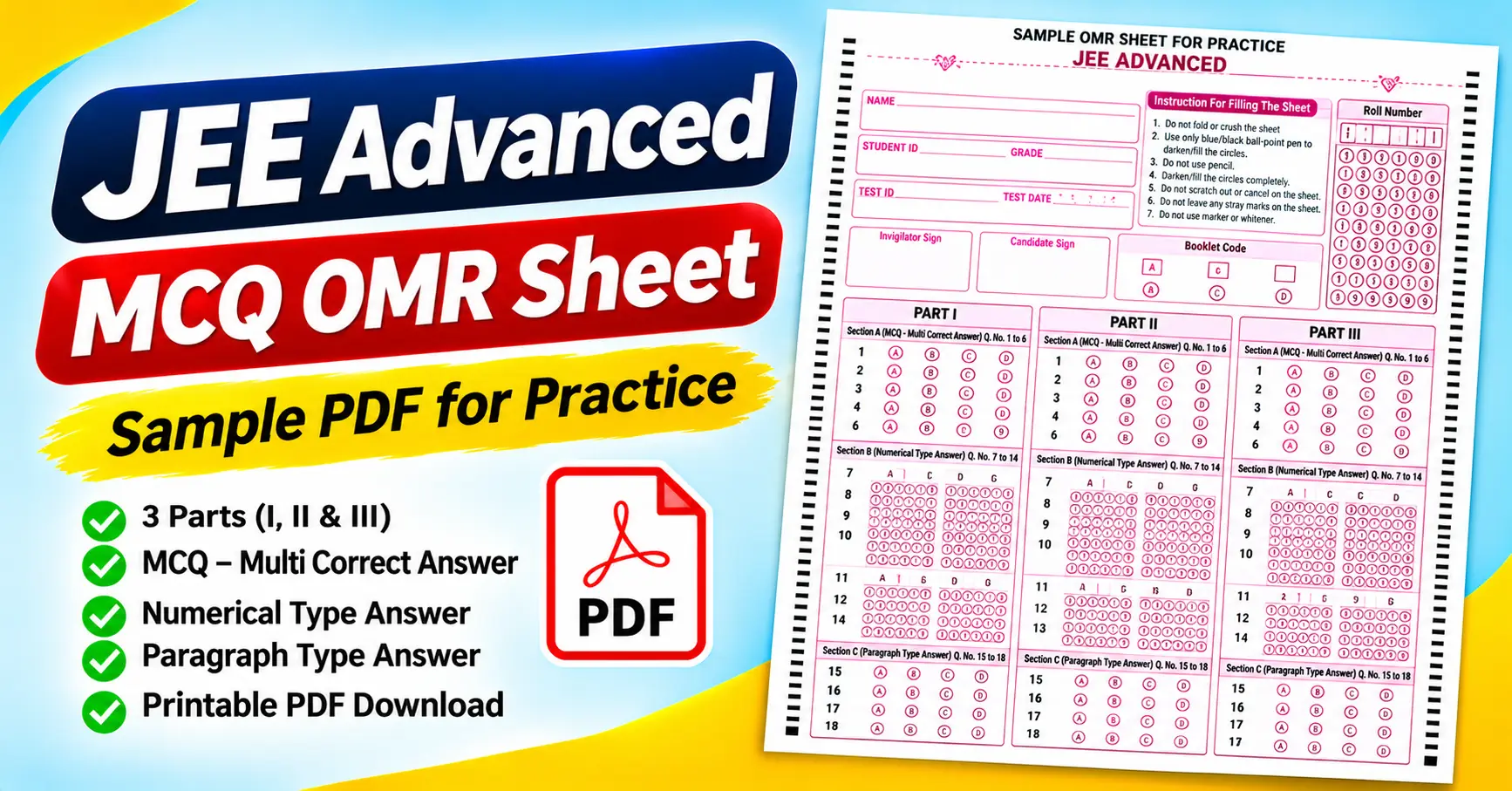
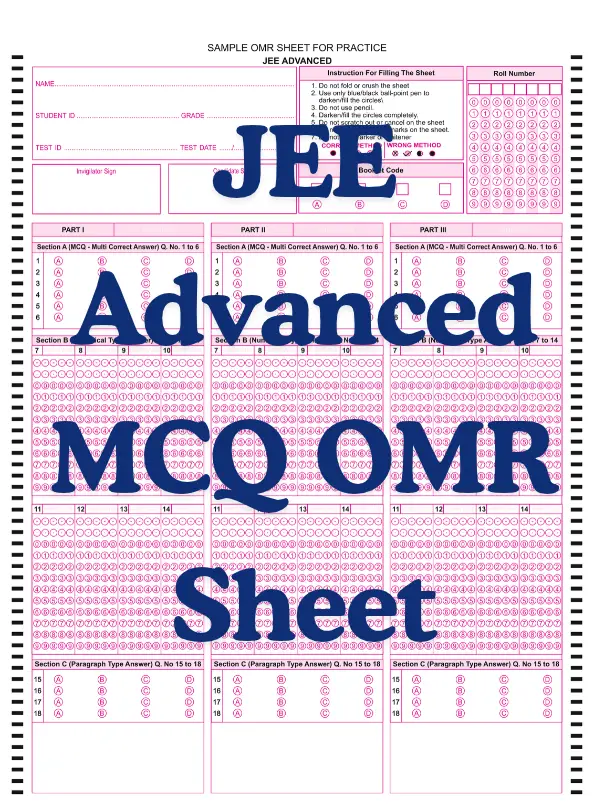
The JEE Advanced MCQ OMR Sheet PDF attached to this article is a sample sheet designed for practice. Unlike a basic multiple-choice answer sheet, it includes different response formats, such as multiple-correct-answer questions, numerical-answer questions, and paragraph-type questions.
The sheet also contains student identification fields, a roll-number grid, a booklet-code section, and instructions for filling the circles. In this guide, we will examine the attached PDF, explain how to use it for mock tests, and highlight important differences between this practice template and the requirements of an official JEE Advanced examination.
Download the JEE Advanced MCQ OMR Sheet PDF
You can download the attached sample and print it for practice.
The attached file is a one-page, portrait-oriented sample titled “Sample OMR Sheet for Practice – JEE Advanced.”
It has three parts: Part I, Part II, and Part III. Each part includes sections for multiple-correct-answer questions, numerical-answer questions, and paragraph-type questions.
Important: This is a practice template, not a verified copy of the current official JEE Advanced answer sheet. Use the instructions and response formats specified by the official examination authority for the examination you are taking.
What Is a JEE Advanced OMR Sheet?
An OMR sheet is an answer sheet that uses marked circles or bubbles to record responses. OMR stands for Optical Mark Recognition, a technology that detects marks in designated positions on a printed form.
In a typical multiple-choice question, a student selects an option and fills the corresponding bubble. You can then check the answer manually or process it with a compatible scanning system.
However, JEE Advanced preparation requires more than practicing a conventional A–D answer sheet. Different question types may require different ways of recording responses, and the attached sample reflects this distinction.
For example, the supplied sheet includes multiple-correct-answer questions with options A, B, C, and D, as well as numerical-answer fields containing digit bubbles. These formats should not be treated as interchangeable.
This sample is for practicing how to navigate a structured answer sheet and record responses carefully. It does not establish the current official examination format or marking scheme.
Features of the Attached JEE Advanced Sample OMR Sheet
The attached PDF contains several useful sections. Understanding them before starting a mock test can make the practice session more organized.
1. Student identification fields
At the top of the sheet, you will find spaces for:
- Name
- Student ID
- Grade
- Test ID
- Test date
These fields help identify the person taking the test and the particular practice session.
Fill in the details required by your mock-test organizer. Check the spelling of your name and the test information before starting the answer section.
2. Roll-number grid
The sheet includes a roll-number section with columns of digit bubbles numbered from 0 to 9.
This grid allows a student to represent a numeric roll number by filling the corresponding digit in each position.
For example, if one digit of your roll number is 6, you mark the circle labeled 6 in the appropriate column.
Check each digit carefully. An incorrect roll number can make it difficult to match the sheet to the correct student, even when the answers themselves are accurate.
3. Booklet code
The attached sample includes a booklet-code section with options A, B, C, and D.
For practice, you can use this field to identify a question-paper version if your mock test uses different sets.
Do not select a code at random. If you are using a question booklet with a specified code, follow the instructions provided by the organizer
4. Part I, Part II, and Part III
The main answer area is divided into three parts, each with a similar structure.
This makes the layout easier to navigate as you work through different groups of questions. Before recording an answer, identify the correct part and question number.
The repeated layout also means you should pay attention to the section heading rather than relying only on a question number or its position on the page.
5. Section A: Multiple-correct-answer questions
The attached sheet labels Section A as “MCQ – Multi Correct Answer” and identifies Questions 1 to 6.
The visible answer options are A, B, C, and D.
The key detail is the phrase m”multi-correct answer. It indicates that the sample section is intended for questions where more than one option may be correct, rather than assuming every question has exactly one answer.
For practice, follow the question paper’s instructions on how many options you can select and how responses are scored. Do not assume that the marking rules for one question type apply to every other section.
6. Section B: Numerical-type answers
Section B is labeled “Numerical Type Answer” and covers Questions 7 to 14.
Instead of using a simple A–D selection for each question, the sample provides numerical response fields with digit bubbles from 0 to 9.
This is useful for practicing how to record numeric answers in the format shown on the sheet.
Pay attention to each digit’s position. A correct numerical answer can be recorded incorrectly if the digits are entered in the wrong order or the wrong question field is used.
7. Section C: Paragraph-type answers
Section C is labeled “Paragraph Type Answer” and covers Questions 15 to 18.
The sample displays A–D response bubbles for these questions. It also provides a large blank area beneath the section.
That blank area is part of the attached design. Still, the PDF alone does not explain how touse it.. Follow the instructions associated with your practice question paper rather than assuming the space is intended for writing full answers.
8. Candidate and invigilator signatures
The upper portion of the page contains separate spaces for the invigilator’s signature and the candidate’s signature.
These fields can be useful for supervised mock examinations. Complete them when the test organizer requires them.
For self-study, you may not need signatures at all. The presence of a field on a sample form does not mean it is mandatory for every practice session.
9. Instructions for filling the sheet
The attached sample lists several instructions:
- Do not fold or crush the sheet.
- Use only a blue or black ballpoint pen to fill the circles.
- Do not use a pencil.
- Fill the circles.
- Do not scratch out or cancel answers on the sheet.
- Avoid stray marks.
- Do not use a marker or whitener.
These instructions describe the supplied practice template. For an actual JEE Advanced examination, the current official instructions take priority.
Who Can Use the JEE Advanced Sample OMR Sheet?
JEE Advanced aspirants
Students preparing for JEE Advanced can use the sample to practice identifying question sections and recording responses in the intended fields.
This can be especially useful during timed mock tests, when switching between different question types requires attention.
JEE Main students
Students preparing for JEE Main may also find a structured answer sheet useful for practicing recording responses. However, the question formats and official examination procedures are not necessarily identical.
Use this particular sheet only when its layout matches the practice exercise.
Coaching institutes
Coaching centers can use sample answer sheets during supervised tests and revision sessions.
The three-part layout lets instructors organize questions by section and discuss mistakes involving question numbers, response formats, or identification fields.
Teachers and individual learners
Teachers and individual learners can use the sheet to practice multiple-choice and numerical-answer recording.
For self-study, record your results separately and compare them with a prepared answer key after completing the test.
How to Print the JEE Advanced OMR Sheet PDF
A clear printout is important because the form contains small bubbles, digit grids, and several closely spaced sections.
Step 1: Download and open the PDF
Download the attached file and open it in Adobe Acrobat Reader or another compatible PDF viewer.
Check that all three parts- the roll-number grid, the booklet-code field, and the bottom sections are visible.
Step 2: Choose the appropriate paper size
The attached document is presented as a portrait-oriented page. Select a paper size that matches the original PDF dimensions and your printer settings.
A4 is a common paper size, but check the actual document settings before printing.
Step 3: Check the scaling
Review the print preview and choose a scaling option that preserves the layout.
Avoid stretching the sheet disproportionately. Changes to the page dimensions can affect bubble spacing and the readability of small labels.
Step 4: Print a test copy
Print one sample before producing several copies.
Check that the question numbers, answer bubbles, numerical digit grids, and identification fields are clear and not clipped.
Step 5: Prepare the mock test
Use the sheet with a question paper that matches its structure.
Explain how students should complete their identification details and record responses. If you are using it for automated scanning, first confirm that the intended system supports the layout.
How to Use the Sheet During a Practice Test
Step 1: Complete the identification fields
Enter your name, student ID, grade, test ID, and test date as required.
Check the roll number carefully if your test uses the digit grid. Completing these details first can prevent confusion later.
Step 2: Identify the question type
Before marking an answer, check whether the question belongs to Section A, B, or C.
The attached template uses different response formats for multiple-correct-answer and numerical-answer questions. Applying the wrong response method can invalidate an otherwise correct answer.
Step 3: Match the question number
Find the exact question number in the correct part and section.
For example, if you are answering Question 8 in Section B, locate the numerical-answer field for Question 8. Do not record the response in a nearby field simply because it is visually close.
Step 4: Record the response carefully
For multiple-correct-answer questions, follow the instructions for selecting options.
For numerical questions, record the digits in the appropriate positions. Double-check the order of the digits before moving to the next question.
Step 5: Avoid unnecessary corrections
The supplied sample warns against scratching out or canceling answers.
During practice, use a separate rough sheet to work through calculations and decide on your response before marking the answer sheet. If you make a mistake, follow the rules of the particular test rather than assuming corrections will be accepted.
Step 6: Review the completed sheet
Before submitting the sheet, check your identification details and review the recorded responses.
Look for unanswered fields, accidental marks, and answers entered in the wrong section.
Common Mistakes to Avoid
1. Treating every question as a single-answer MCQ. The attached sample explicitly labels Section A as a multiple-correct-answer section. Follow the question’s instructions.
2. Recording numerical answers in the wrong field. Check both the question number and the numerical response area.
3. Ignoring the part and section headings. The sheet repeats a similar structure across Parts I, II, and III. Locate the correct section before marking a response.
4. Using an unsuitable writing instrument. The sample specifies a blue or black ballpoint pen and says not to use a pencil, marker, or whitener. Official examination instructions may specify the permitted instrument more precisely.
5. Leaving incomplete bubbles. The sample instructs users to fill circles. Follow the marking rules for the form you are using.
6. Making stray marks or folding the sheet. These actions can affect readability and may interfere with scanning.
7. Assuming the sample is the official current JEE Advanced format. The file is explicitly labeled as a sample for practice. Verify the current examination requirements before relying on any template for an official test.
8. Assuming all question types have the same scoring rules. Multiple-correct-answer and numerical-answer questions can have different response and marking requirements. Use the rules supplied with the particular mock test.
How to Check Your Answers After the Test
After completing the mock examination, compare your responses with a prepared answer key.
For multiple-correct-answer questions, compare the full selected set with the expected response and apply the scoring rules for that question type. For numerical questions, check the recorded digits against the expected numerical answer.
You can use Google Sheets or Microsoft Excel to organize the results. Create columns for the question number, question type, your response, the correct response, and the score.
A simple comparison formula can help with straightforward answers. For example, if the recorded response is in cell B2 and the correct response is in C2, use:
=IF(B2=C2,1,0)
This formula is only a basic illustration. It does not account for partial credit, multiple-correct-answer scoring, numerical tolerances, or unanswered questions. For those cases, use a formula that matches the marking rules of your practice test.
Review the results to identify whether mistakes came from subject knowledge, calculation, question interpretation, or answer recording. That distinction makes your next practice session more useful.
Frequently Asked Questions
1. Is the attached JEE Advanced OMR sheet free to download?
The attached PDF is available through the download link provided in this article. It is labeled as a sample sheet for practice.
2. How many parts are included in the sample?
The sheet contains three parts: Part I, Part II, and Part III.
3. Which question types are shown?
The attached sheet includes multiple-correct-answer questions, numerical-type answers, and paragraph-type questions.
4. Does the sample include a roll-number grid?
Yes. The top-right section contains a roll-number grid with digit bubbles from 0 to 9.
5. Which pen does the sample recommend?
The printed instructions specify a blue or black ballpoint pen and state that users should not use a pencil. For an official examination, follow the current official instructions.
6. Can I use this sheet for an official JEE Advanced examination?
Do not assume so. The supplied document is explicitly labeled as a practice sample. Use the official examination materials and instructions for the actual examination.
7. Can I use this sheet for other competitive examinations?
It may be useful for practice when the question formats and answer fields match. Other examinations can have different layouts, question types, and marking rules.
8. Can the completed sheet be checked automatically?
Possibly, but the sample PDF alone doesn’t confirm compatibility. Automated checking requires software that supports the form’s layout and response formats.
Final Thoughts
The JEE Advanced MCQ OMR Sheet PDF can be a useful practice resource for students who want to become familiar with a structured answer sheet.
The attached sample includes identification fields, a roll-number grid, a booklet-code section, signature fields, and three parts containing multiple-correct-answer, numerical-answer, and paragraph-type sections.
Before printing it, check the layout and make sure it matches your mock test. Practice recording each response in the correct section, follow the supplied marking instructions, and review your answers after the test.
Most importantly, treat the attached file as a practice template, not a verified copy of the current official JEE Advanced answer sheet. For the actual examination, follow the latest instructions issued by the examination authority.