When preparing for JEE Main, most students spend hours solving Physics numericals, balancing Chemistry equations, and practicing Mathematics problems. But during a mock test, another small task can cause unnecessary confusion: recording answers correctly on an answer sheet.
Imagine solving Question 24 correctly but accidentally marking the bubble for Question 25. Your calculation may be perfect, yet your recorded response is wrong. Practicing with an OMR-style answer sheet can help you become more comfortable with question numbering, answer marking, and examination routines.
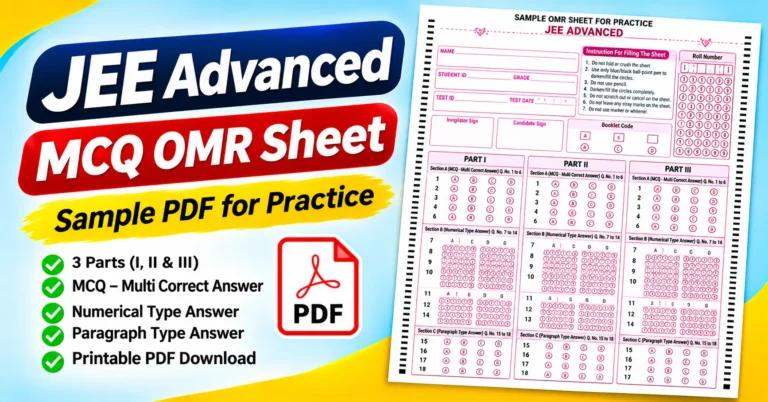
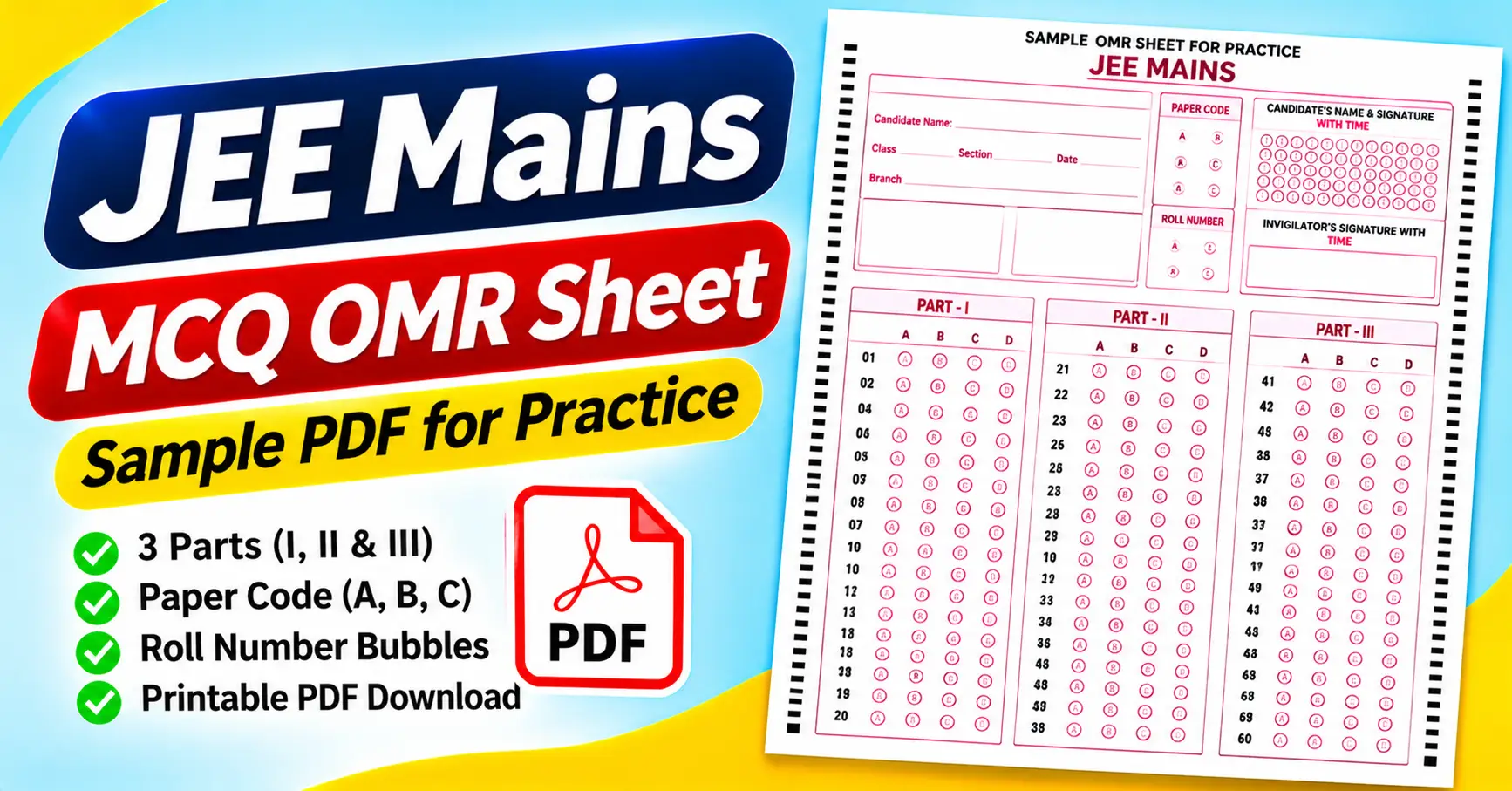
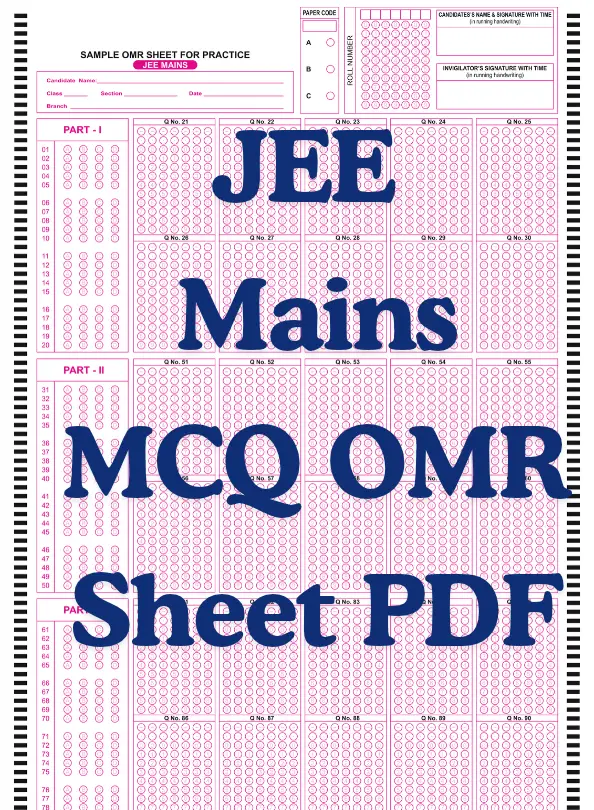
The JEE Mains MCQ OMR Sheet PDF attached to this article is a sample answer sheet designed for practice. It includes candidate details, a roll-number bubbling grid, a paper-code section, signature fields, and a structured answer area divided into three parts.
In this guide, you will learn what the attached sheet contains, how to download and print it, how to use it during mock tests, and which mistakes to avoid.
Download the JEE Main MCQ OMR Sheet PDF
The attached file is a one-page, portrait-format sample OMR sheet for JEE Main practice. You can download it and use it with a compatible mock-test question paper.
Download the JEE Mains MCQ OMR Sheet PDF
The sheet is labeled “Sample OMR Sheet for Practice – JEE Mains.” It includes fields for candidate information and paper code, along with answer sections marked Part I, Part II, and Part III.
Important: This is a practice template, not a verified copy of the current official JEE Main answer sheet. JEE Main is conducted using computer-based testing, so candidates should follow the current instructions issued by the National Testing Agency (NTA) rather than assume the actual examination uses a printed OMR sheet.
What Is a JEE Mains MCQ OMR Sheet?
OMR stands for Optical Mark Recognition. It refers to technology used to detect marks in designated areas of a printed form.
On a conventional OMR answer sheet, candidates select an answer by filling the corresponding bubble. For example, if the answer to Question 12 is option C, the candidate fills the C bubble in the row numbered 12.
An OMR-style sheet can be useful for paper-based practice because it separates working through a question from recording the final answer.
However, the supplied JEE Main sample is a practice resource. Its layout does not establish the format used by the NTA in the actual computer-based JEE Main examination.
The sample is useful for practicing answer-recording habits, question numbering, and identification details. If you are preparing for the official examination, you should also become familiar with its computer-based interface and current examination procedures.
Features of the Attached JEE Mains OMR Sheet
The attached PDF includes several sections that make it a useful reference for structured mock-test practice.
1. Candidate information fields
At the top of the sheet, there are spaces for:
- Candidate name
- Class
- Section
- Date
- Branch
These fields allow a teacher, tutor, or student to identify the practice session.
For a classroom test, complete the fields the organizer requires. For individual practice, you can enter your name, date, and other relevant details.
2. Paper-code section
The sample contains a paper-code area with options A, B, and C.
This section can be used in a practice test where different question-paper versions are assigned different codes.
Do not select a code at random. If your mock-test question paper specifies a code, follow the organizer’s instructions.
3. Roll-number bubbling grid
The sheet includes a roll-number grid with digits from 0 to 9 in multiple columns.
This arrangement lets you represent a numeric identifier by filling the appropriate digit in each position.
For example, if a digit in your roll number is 5, mark the circle labeled 5 in the corresponding column.
Check every digit before beginning the answer section. An incorrect identification number can create confusion when a teacher collects and evaluates multiple sheets.
4. Candidate and invigilator signatures
The top-right area includes spaces for the candidate’s name and signature with time, as well as the invigilator’s signature with time.
These fields may be useful in supervised mock tests where the organizer wants to record when the sheet was completed or checked.
They are features of the supplied template, not evidence that the same fields are required in the official computer-based JEE Main examination.
5. Three answer sections
The main answer area is divided into three parts:
- Part I
- Part II
- Part III
The sections are arranged vertically down the page. This helps organize the answer area into separate blocks.
When using the template, pay attention to the printed question numbers and part headings. Do not assume that the position of a question on the page corresponds to its position in a different question paper.
6. Multiple-choice response bubbles
The sample includes A, B, C, and D response options in its answer area.
For example, if you choose option B for Question 18, locate the row numbered 18 and mark the corresponding B bubble.
The sheet’s printed question numbers and response positions are designed for practice. Check that they match your mock-test question paper before using it.
7. Registration marks and page layout
The attached page includes repeated black registration marks along the sides and a compact arrangement of response bubbles.
These elements are part of the form’s visual layout. Their presence alone does not guarantee compatibility with an automated OMR scanner.
If you want to scan completed sheets, confirm that the software supports the exact template and its page dimensions.
Who Can Use This JEE Mains Practice Sheet?
JEE Main aspirants
Students preparing for JEE Main can use the sample to practice recording answers on paper during timed mock tests.
This can help develop a routine for checking question numbers and recording final responses. However, it should supplement, not replace, practice with the official computer-based examination format.
Coaching institutes
Coaching centers can use a printed answer sheet for classroom assessments, revision tests, and offline mock examinations.
A consistent layout can make it easier for students to record answers and for teachers to compare responses against an answer key.
School and college students
Students taking objective-format assessments can use the template if its question numbering and answer choices match their practice paper.
Check the format before printing multiple copies.
Teachers and tutors
Teachers can use the sheet to demonstrate how structured answer recording works. It can also help students practice checking identification fields and reviewing their responses after a test.
How to Download and Print the JEE Mains OMR Sheet
You can open the attached PDF using Adobe Acrobat Reader, a web browser’s PDF viewer, or another compatible application.
Step 1: Download the PDF
Use the download link provided near the beginning of this article.
Save the file to your computer or phone so that you can open and print it when needed.
Step 2: Check the complete page
Open the PDF and confirm that the candidate details, paper code, roll-number grid, signature fields, and all three answer sections are visible.
Check that the bottom of the page is not clipped.
Step 3: Select the paper size
Choose a paper size that matches the original document dimensions. A4 is commonly used for printing in India, but check the actual PDF settings before printing.
Avoid stretching the page to fit a different paper format without reviewing the effect on the layout.
Step 4: Review the scaling settings
Use the print preview to check whether the complete page fits within the printable area.
Choose a setting that preserves the proportions and keeps the bubbles readable. If you reduce the sheet too much, the answer areas may become uncomfortable to mark.
Step 5: Print one test copy
Before printing a large batch, print one sheet.
Check that the question numbers and answer bubbles are clear, the identification fields are readable, and the margins are intact.
Step 6: Match the sheet to your mock test
Use the template only with a question paper whose numbering and response format match the printed sheet.
If the paper has a different number of questions or a different response structure, choose or prepare a suitable answer sheet instead.
How to Use the Sheet During a Mock Test
Step 1: Complete the identification details
Enter the information required by the practice-test organizer.
Check your name, date, and roll number before beginning. This is easier than correcting identification details after the test has finished.
Step 2: Read the question carefully
Solve the question and decide on your answer before recording it.
For example, if you solve a Chemistry question and determine that option C is correct, locate the appropriate question row and mark C.
Step 3: Check the question number
Always match the answer to the printed question number.
This is particularly important when skipping a difficult question and returning to it later. A momentary numbering error can shift several subsequent responses.
Step 4: Record the answer clearly
Follow the mock-test organizer’s instructions for marking the bubbles.
If you are practicing for an examination that uses a computer-based interface, also practice selecting answers and navigating between questions on a computer. A printed sheet cannot fully reproduce that experience.
Step 5: Review unanswered questions
At the end of the mock test, check whether you have missed any questions unintentionally.
If you deliberately left a question unanswered, keep it distinct from an accidental omission when reviewing your performance.
Step 6: Compare responses with the answer key
After the test, compare your marked responses with the prepared answer key.
Record correct, incorrect, and unanswered questions. Apply the mock test’s marking scheme rather than assuming every question has the same marks or penalty.
Common Mistakes to Avoid
1. Treating the sample as an official JEE Main answer sheet. The attached file is labeled as a practice sheet. JEE Main uses a computer-based examination format, so follow the current NTA instructions for the actual test.
2. Marking the wrong question number. Always check the printed number before recording an answer.
3. Entering an incorrect roll number. Check each digit in the bubbling grid before beginning the test.
4. Ignoring the paper code. If your mock test uses paper codes, record the correct one per the organizer’s instructions.
5. Printing at the wrong scale. Poor scaling can make the bubbles difficult to read or mark. Review the print preview and test one copy.
6. Assuming automated scanning will work. Registration marks and bubble layout do not guarantee the PDF will work with every OMR scanner. Test the complete setup before using automated evaluation.
7. Using only paper-based practice. Because the official JEE Main examination is computer-based, include computer-based mock tests in your preparation. Practicing on paper alone will not familiarise you with the official interface.
How to Calculate Your Mock-Test Score
After completing a practice test, compare your answers against the answer key and apply the scoring rules for that test.
For example, suppose a mock test contains 100 questions, and you answer 72 correctly, 18 incorrectly, and leave 10 unanswered.
If every correct answer carries one mark and there is no negative marking, your score would be 72 out of 100.
If the test applies negative marking, the final score will differ. Use the actual marking scheme supplied with the practice paper.
You can record your results in Google Sheets or Microsoft Excel. Create columns for the question number, your answer, the correct answer, and the result.
For straightforward single-answer questions, this formula can compare two cells:
=IF(B2=C2,1,0)
If your selected answer is in B2 and the correct answer is in C2, the formula returns 1 when the responses match and 0 when they do not.
Extend the formula across the questions and review the results. For more complex scoring rules, adjust the calculation to match your mock test.
Frequently Asked Questions
1. Is the JEE Mains MCQ OMR Sheet PDF free to download?
The attached practice PDF is available through the download link in this article.
2. What information is included in the sample?
The sheet includes candidate name, class, section, date, branch, paper code, roll-number bubbles, candidate and invigilator signature fields, and three answer sections.
3. How many answer options are shown?
The sample displays A, B, C, and D response options.
4. Can I use this sheet for JEE Main preparation?
Yes, as a practice resource, as long as the sheet matches your mock-test question paper. It does not replace computer-based mock tests or official examination instructions.
5. Does JEE Main use a printed OMR sheet in the actual examination?
JEE Main is conducted in computer-based mode. Candidates should follow the current NTA examination instructions rather than assume that this printed practice sheet is used during the actual test.
6. Can I print the PDF at home?
Yes. Open it in a compatible PDF viewer, check the paper size and scaling, and print one sample before making additional copies.
7. Can the sheet be checked using an OMR scanner?
Possibly, but the PDF alone doesn’t confirm compatibility. Confirm that your scanning system supports the layout and test it before relying on automated evaluation.
8. Should I practice on paper or a computer?
Both can be useful for different purposes. The sheet can help you practice structured answer recording, while computer-based mock tests can familiarise you with the format used in JEE Main.
Final Thoughts
The JEE Main MCQ OMR Sheet PDF is a practical reference for students who want to practice recording answers on a structured sheet during offline mock tests.
The attached sample includes candidate information, a paper-code field, a roll-number bubbling grid, signature areas, and three answer sections. These features make it useful for practicing identification and answer-recording routines.
Before printing, check that the template matches your question paper and that the layout is readable. Review your answers after each mock test and use the results to identify mistakes.
Most importantly, remember that the attached file is a practice template. For the actual JEE Main examination, follow the current official instructions and include computer-based mock tests in your preparation.