Imagine organizing an examination for hundreds of candidates. You need to collect their answers, keep records for the examination department, and keep the paperwork organized after the test. Using separate answer sheets for each purpose can increase paper handling and create more opportunities for administrative mistakes.
A carbonless OMR sheet is one option for examinations where duplicate records are useful. It combines an answer-marking layout with a system designed to produce or maintain multiple copies of the recorded information, depending on the paper and printing method used.
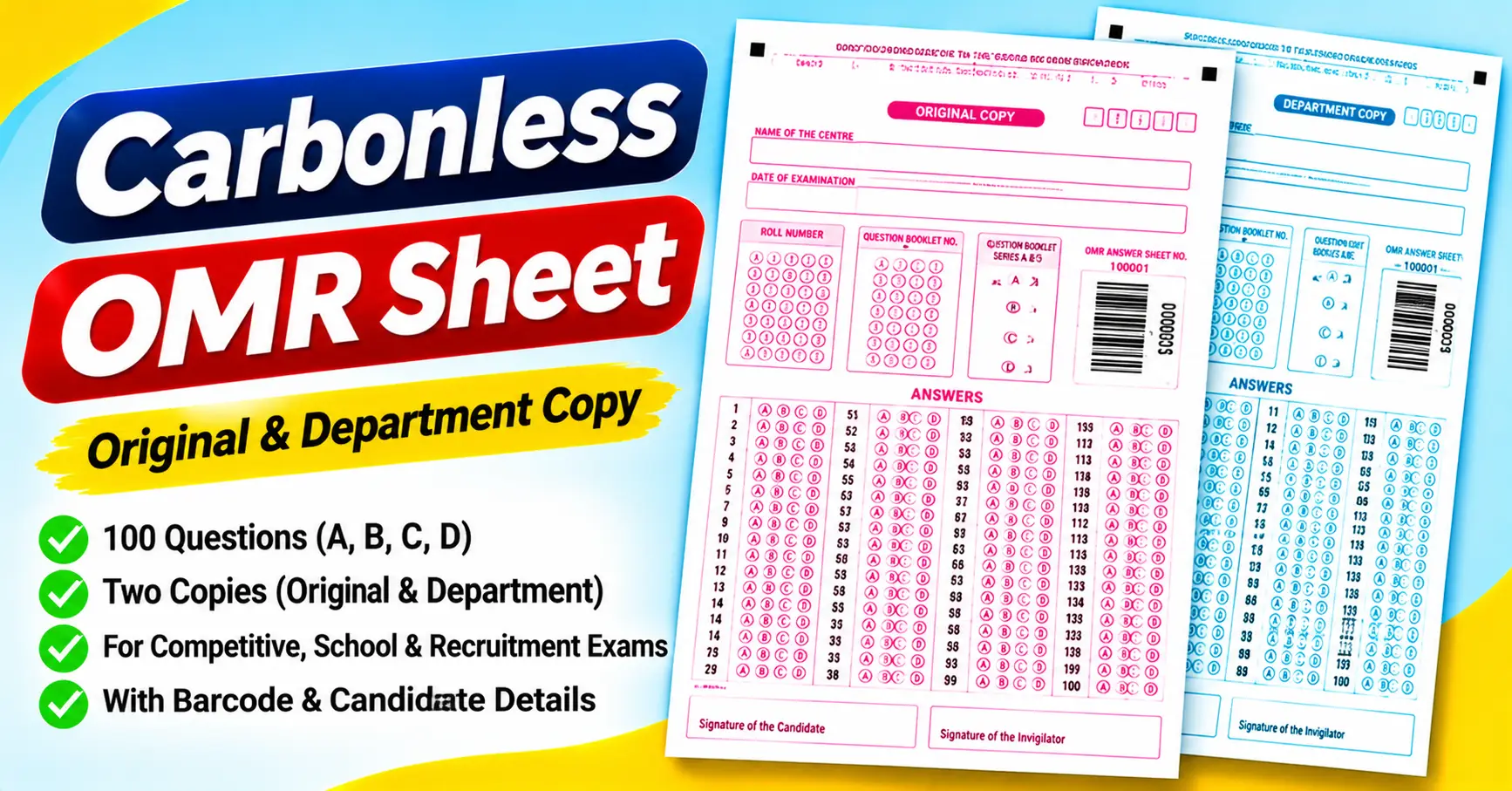
The Carbonless OMR Sheet PDF attached to this article provides a practical example of a multiple-copy examination answer sheet. It contains 100 questions with four answer options, candidate and examination details, a barcode area, and signature fields. The first page is labeled “Original Copy” and uses pink design elements, while the second page is labeled “Department Copy” and uses blue design elements.
In this guide, we will explain how carbonless OMR sheets work, what is included in the attached PDF, where these forms can be useful, and what to check before printing or using them.
Download the Carbonless OMR Sheet PDF
You can open the attached two-page sample to inspect its layout and use it as a reference when preparing an examination answer sheet.
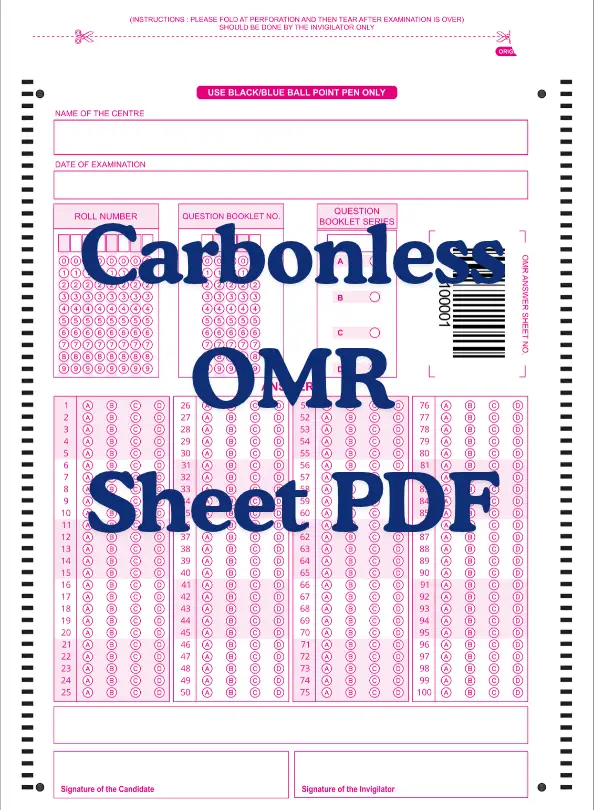
The supplied PDF contains two versions of a 100-question answer sheet: an original copy and a department copy. Each version includes four answer options, A, B, C, and D.
Important: The PDF shows two coordinated pages, but the file itself does not establish that printing it on ordinary paper will produce a carbonless duplicate. To create a true carbonless form, you need compatible multipart paper and a suitable printing process, or a system specifically designed to transfer marks between copies.
What Is a Carbonless OMR Sheet?
An OMR sheet is a form used to record answers by marking designated bubbles. OMR stands for Optical Mark Recognition, a technology that detects marks in specific positions on a printed page.
A carbonless form creates duplicate records without using a separate sheet of traditional carbon paper. Commercial carbonless paper often uses pressure-sensitive coatings that transfer writing or printing impressions from one sheet to another in a multipart set.
When combined, these concepts allow a carbonless OMR form to support examination administration while maintaining duplicate records.
However, an important technical distinction remains. Carbonless paper does not automatically mean that every marked OMR bubble will transfer accurately to every copy. The paper, printing method, marking instrument, form design, and scanning requirements all matter.
The attached PDF is a useful visual reference for a two-copy examination form. Whether its bubbles can be transferred and read reliably depends on the physical materials and production method used.
What Is Included in the Attached Carbonless OMR Sheet?
The supplied document has two pages, each showing a similar 100-question answer sheet. Here is what the pages contain.
1. Original Copy and Department Copy
Page 1 is labeled “Original Copy” and uses pink design elements. Page 2 is labeled “Department Copy” and uses blue design elements.
The two versions share the same basic layout, allowing the form to distinguish between the candidate-facing original and the department’s copy.
The labels identify the intended roles of the pages, but they do not prove the PDF was printed on carbonless paper or that marks transfer between the pages.
2. Examination center name
Both pages contain a field labeled “Name of the Center.”
This space lets the examination organizer record the center responsible for the test. This is useful when answer sheets from multiple locations need to be organized.
3. Date of examination
A separate field records the examination date.
This helps distinguish between different examination sessions and supports record management when several tests are conducted at the same center.
4. Roll number bubbling grid
The sheet includes a roll number field with individual digit positions and bubbles numbered 0 through 9.
Candidates can record their numeric identification by marking the appropriate digits in the corresponding columns. This is useful for structured data entry, provided the grid is filled in correctly.
An incorrect roll number can cause identification problems even if the answers are marked correctly, so this section deserves careful attention.
5. Question booklet number
A separate field is provided for the question booklet number.
This helps associate an answer sheet with the question paper used during the examination. The booklet number should match the information provided by the examination organizer.
6. Question booklet series
The attached form includes a question booklet series section with options A, B, C, and D.
This is useful when an examination has multiple question-paper versions. Candidates should mark the correct series according to their booklet and the examination instructions.
7. Barcode and answer-sheet number
Both pages show a barcode-style graphic and an answer-sheet number area. The visible sample includes the number 100001.
A barcode can support identification or processing when it is generated and configured for the intended system. However, a barcode graphic alone does not establish that each copy has a unique identifier or that a particular scanner can read it.
If you plan to use the form for automated processing, verify how the barcode and answer-sheet number will be assigned and recorded.
8. One hundred multiple-choice questions
The answer section contains 100 numbered questions, from 1 to 100.
Each question has four response bubbles labeled A, B, C, and D. The questions are arranged in four blocks:
- Questions 1–25
- Questions 26–50
- Questions 51–75
- Questions 76–100
This makes the attached template suitable as a reference for a 100-question, four-option examination.
9. Candidate and invigilator signatures
At the bottom of both pages, the form provides separate spaces for the candidate’s and invigilator’s signatures
These fields can support examination documentation when signatures are required. The organizer should explain whether signatures must be completed on one copy or both.
10. Perforation and tearing instructions
At the top of each page, the sheet states that it should be folded at the perforation and torn only after the examination, with the invigilator acting.
This instruction is relevant to the intended physical form. A PDF printed on ordinary paper will not automatically contain a perforation. If you are producing a physical multipart form, the perforation and separation method must be incorporated into the manufacturing or finishing process.
How Does a Carbonless OMR Sheet Work?
A carbonless OMR sheet involves two related processes: recording the answers and managing duplicate copies.
The answer-marking process
Candidates select their responses by filling the appropriate bubbles. For example, if the answer to Question 24 is C, the candidate fills the C bubble in the row numbered 24.
If the form is intended for OMR scanning, the bubble positions and printing characteristics must match the scanning system’s requirements.
The duplicate-copy process
Traditional carbonless forms use specially coated paper to transfer writing or printing impressions between sheets in a multipart set.
For an OMR application, however, you must test the duplicate process carefully. Ordinary pen pressure may create a visible impression on another sheet, but that does not guarantee every bubble will reproduce with the clarity needed for reliable optical recognition.
The attached PDF’s two pages illustrate the original and department copies. They do not demonstrate a working pressure-transfer mechanism.
The evaluation process
Once the answer sheets are collected, you may check responses manually or process them using compatible OMR software.
Automated checking requires a supported form layout, appropriate scanning conditions, and a correctly configured answer key. Carbonless duplication is separate from whether the scanner can recognize the marks.
For this reason, test the physical form before using it in a large examination.
Where Can Carbonless OMR Sheets Be Used?
Carbonless forms can be useful when an organization needs multiple records of the same information. An OMR layout may suit records that include multiple-choice responses.
1. Competitive examinations
Examinations such as NEET, JEE, UPSC, and SSC use objective-question formats in various stages or tests. The exact answer-sheet requirements differ by examination.
A carbonless OMR design may be considered for practice assessments or administrative workflows that require duplicate records, but do not assume these examination authorities will accept it.
For an official examination, always use the prescribed answer sheet.
2. School and college examinations
Schools and colleges may use multiple-choice forms for internal tests, entrance assessments, and practice examinations.
A duplicate-copy workflow can be useful where both the examination office and another department require a record. Test the paper and marking process before adoption.
3. Surveys and feedback forms
OMR-style layouts can be adapted for structured surveys where respondents select from predefined options.
Consider a carbonless version when separate departments need physical copies of responses. However, the design must match the type of information being collected and the method used to process it.
4. Recruitment and aptitude tests
Organizations conducting recruitment assessments may use multiple-choice answer sheets for aptitude or knowledge tests.
Duplicate records can support administrative workflows, provided the process protects candidate information and maintains reliable records.
5. Internal voting and elections
Structured response forms may be used for certain internal voting or survey activities. Whether an OMR or carbonless design is appropriate depends on the voting rules, privacy requirements, and method of counting responses.
For confidential or legally regulated elections, use a system designed for the specific requirements rather than assuming that a general-purpose answer sheet is suitable.
6. Market research and attendance
OMR-style forms can also record structured responses for research, training attendance, or other administrative activities.
For these uses, consider whether paper forms are practical and whether duplicate records are genuinely needed. A digital form may be more suitable when you must collect and analyze responses electronically.
How to Prepare and Print a Carbonless OMR Sheet
If you are using the attached PDF as a reference for producing a physical form, follow these steps.
Step 1: Download and inspect the PDF
Open the file in Adobe Acrobat Reader or another compatible PDF viewer.
Check that both pages are present and that the original and department copies have matching question numbers, answer choices, and identification fields.
Step 2: Confirm the intended paper size
Choose the paper dimensions required by the final form design.
Avoid stretching or shrinking the page without checking the effects on the bubbles, barcode, and registration marks. Layout changes can affect both usability and scanning compatibility.
Step 3: Decide how duplicates will be produced
If you only need a printable reference or a form for manual checking, ordinary paper may be sufficient.
If you need a true carbonless duplicate, consult a printer that produces multipart carbonless forms. Explain that the form includes OMR bubbles and ask how the paper and printing method will affect mark transfer.
Step 4: Confirm the marking instrument
The attached form is designed around a four-option answer layout, but it does not specify a complete carbonless paper-production specification.
Ask the printer and scanning-system provider which marking instruments are suitable. The pen must work with the paper and produce marks that can be recognized reliably.
Step 5: Test the complete form
Print or produce a small sample before ordering a large batch.
Fill several bubbles, record sample roll numbers, and test whether the duplicate contains the information needed. If scanning is planned, scan both copies and compare the detected answers.
Include examples with blank responses, filled bubbles, and corrected marks to identify potential problems.
Step 6: Finalize the production process
Once the form passes testing, confirm the print quantity, paper stock, color scheme, perforation, barcode handling, and finishing requirements with the printer.
Keep a reference copy of the approved layout so you can compare future batches against it.
Common Mistakes to Avoid
1. Assuming the PDF itself is carbonless paper. A PDF is a digital document. Carbonless duplication requires suitable physical materials and a compatible production process.
2. Assuming marks will transfer perfectly. Even if a duplicate is visible, it may not be suitable for optical recognition. Test the actual paper, pen, and scanning system together.
3. Changing the answer-sheet scale without checking it. Scaling can alter bubble positions and registration marks. Preserve the layout unless the scanning system supports the modified version.
4. Using an unsupported pen. A marking instrument may work on ordinary paper but perform differently on a carbonless multipart form. Follow the production and scanner specifications.
5. Ignoring the barcode configuration. A barcode graphic is not automatically a unique identification system. Confirm the identifier format and how each sheet will be tracked.
6. Assuming the form is approved for an official examination. The attached PDF is a sample layout. Official examinations may require a specific form, paper stock, marking method, or scanning process.
7. Skipping sample testing. A small test run can reveal alignment, readability, transfer, and scanning issues before they affect a full examination.
Frequently Asked Questions
1. What is a carbonless OMR sheet?
It combines an OMR answer layout with a carbonless duplicate-record process. The physical paper and production method must support the intended duplication and evaluation workflow.
2. How many questions are included in the attached PDF?
The attached file contains 100 questions, each with four options labeled A, B, C, and D.
3. Why are there two pages in the PDF?
Page 1 is labeled”Original Copy”, and page 2 is llabeledDepartment Copy.” Both conhavee same basic answer-sheet layout, witbutfferent design colors.
4. Will printing this PDF on ordinary paper create carbonless copies?
No. Printing the two pages on ordinary paper produces two separate pages. It does not create a pressure-transfer duplicate. A true carbonless form requires appropriate multipart paper and a suitable production process.
5. Can the attached form be scanned automatically?
Possibly, but cthe PDF alone does not establish compatibility The scanning system must support the layout, registration marks, bubble positions, and print characteristics.
6. Can carbonless OMR sheets be used for competitive examination practice?
They may be useful for practice if the question format and marking process are appropriate. For official examinations, follow the examination authority’s specified answer-sheet requirements.
7. What is the purpose of the perforation?
The attached form instructs the invigilator to fold at the perforation and tear after the examination. A physical form needs an actual perforation or suitable finishing method for this instruction to work as intended.
8. Can I customise the attached sheet?
The layout can serve as a design reference, but changes to bubble positions, barcode placement, page scaling, or registration marks may affect scanning. Test any modified version before using it for automated evaluation.
Final Thoughts
A carbonless OMR sheet can be useful when an examination or data-collection process needs structured answers and duplicate records. However, the physical paper, printing method, marking instrument, and scanning system must work together for the process to be reliable.
The attached PDF provides a two-page reference with an Original Copy and Department Copy. Both pages contain 100 questions with four options, center and examination details, roll number and booklet fields, a barcode area, and candidate and invigilator signature spaces.
Use the PDF to inspect the layout and plan your requirements. If you need true carbonless duplication, confirm the paper and production specifications with a qualified printer. If you need automated evaluation, test the complete physical form with the intended scanning system.
A short production trial is far more useful than assuming that a visually correct answer sheet will work exactly as expected.