Have you ever prepared a multiple-choice test, printed the question paper, and then realized that you also need a separate answer sheet for students? For a short examination, checking answers on the question paper might seem convenient. But when you want students to practice a real examination format, a dedicated OMR answer sheet makes the process much more organized.
A 90 Questions OMR Answer Sheet – 4 Options is designed for tests where students must answer up to 90 multiple-choice questions, with four choices for each question. Instead of writing answers individually, students mark the appropriate bubbles on a printed sheet.
This format is useful for classroom tests, competitive exam practice, coaching institute assessments, and subject-wise revision. Teachers can collect responses in a consistent format, while students can practice managing their answers under timed conditions.
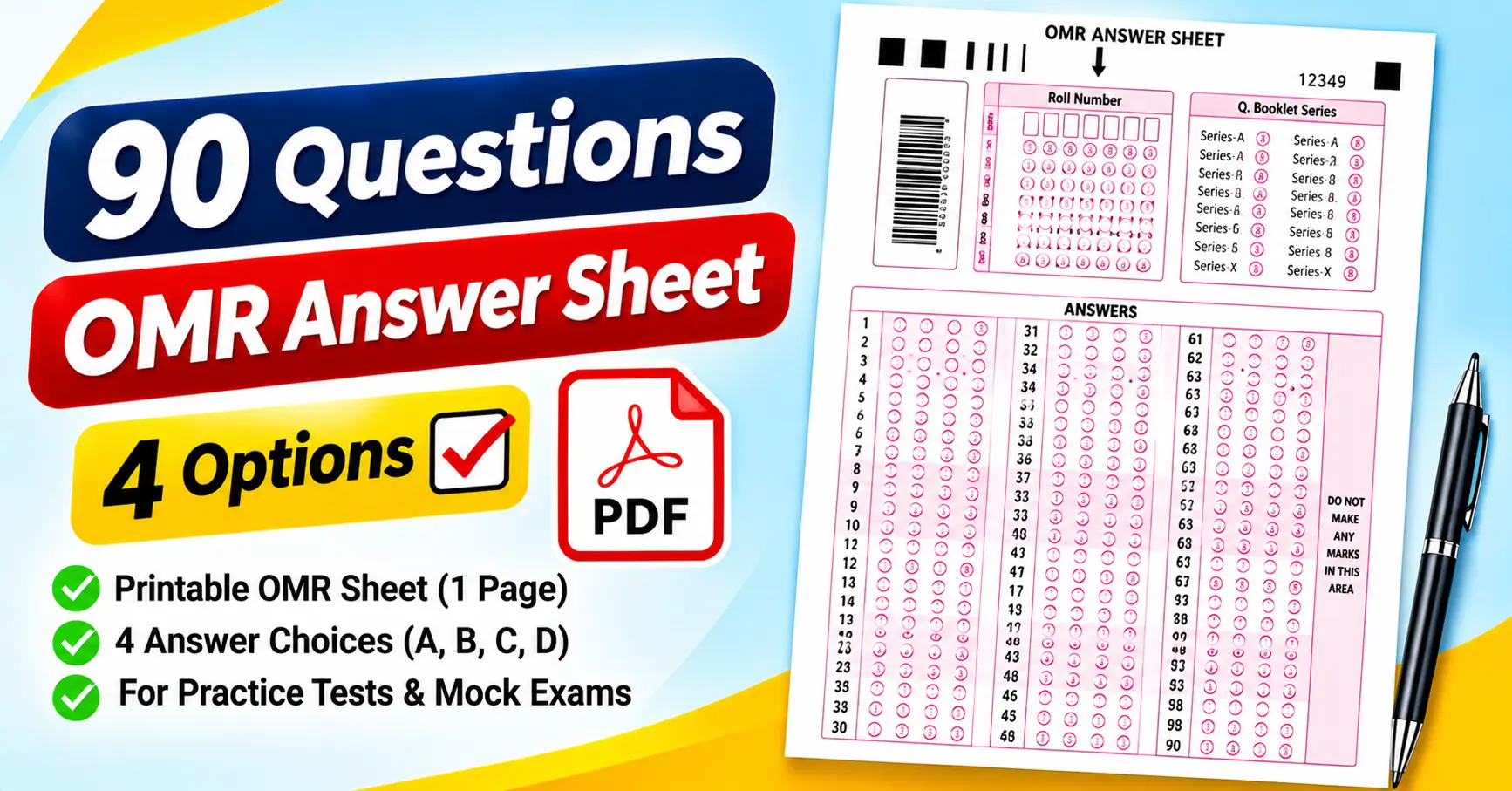
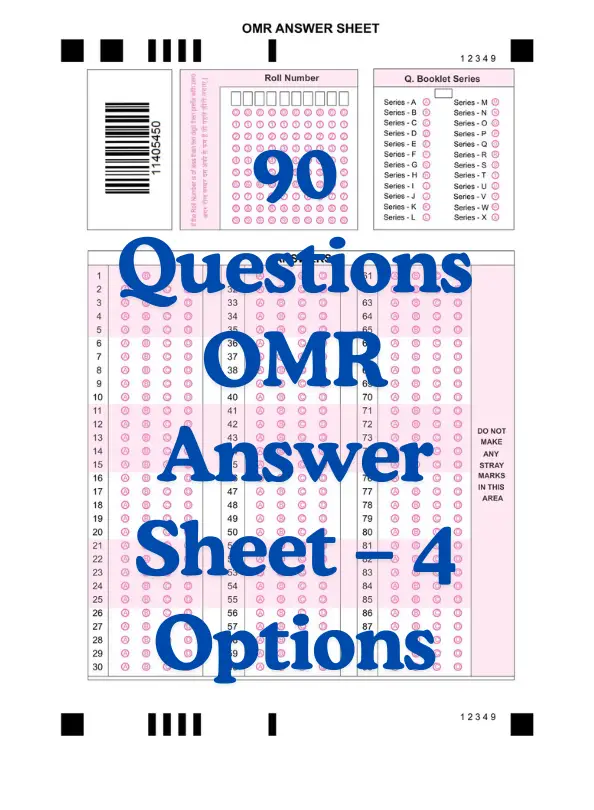
The attached PDF provides a practical example. It contains 90 numbered questions, four answer bubbles per question, a roll number section, question booklet series options, a barcode area, and printed alignment marks. It also includes a warning asking students not to make stray marks in a designated area.
In this guide, we will explore the attached answer sheet, explain how to print and fill it, and discuss common mistakes that can affect answer checking.
What Is a 90-Question OMR Answer Sheet?
OMR stands for Optical Mark Recognition. It is a technology that detects marks placed in specific positions on a printed form.
In a multiple-choice examination, a student selects an answer by filling the corresponding bubble. For example, if Question 12 has four choices and the student selects option C, they mark the third bubble in the row for Question 12.
A 90-question OMR answer sheet follows this process for 90 questions. Each question has four response options, commonly labeled A, B, C, and D, although the precise labels depend on the template.
The attached sheet uses four vertically aligned bubbles for every question. The questions are arranged in three groups:
- Questions 1–30
- Questions 31–60
- Questions 61–90
This layout fits all 90 questions on one portrait-oriented page while keeping the response rows numbered and organized.
A PDF is convenient because you can open it in Adobe Acrobat Reader or a browser’s PDF viewer and print it with a compatible printer. However, a printable OMR-style sheet is not automatically compatible with every scanning or evaluation application. Automated checking depends on the form’s layout and the software being used.
Features of the Attached 90-Question OMR Sheet
The supplied PDF includes several sections beyond the main answer bubbles. Understanding these fields before printing can help you use the sheet correctly.
1. Roll number section
The upper portion of the sheet contains a roll number area with boxes for entering digits and corresponding bubbles.
This allows the student to record a numeric identifier. The exact number of digits supported depends on the printed grid.
Students should check their roll number before marking the bubbles. An incorrect identifier can create confusion when answer sheets are collected and evaluated.
2. Question booklet series
The attached sheet contains a section labeled “Q. Booklet Series.” It lists series from A through X, including Series A, Series B, and Series C.
This section is useful when an examination uses different question paper versions. Students should select the series printed on their question booklet, as instructed.
Do not choose a booklet series at random. If different versions use different question orders or answer keys, an incorrect selection can affect evaluation.
3. Barcode area
A barcode-style graphic appears on the left side of the sheet.
The barcode is part of the supplied design. Still, its presence alone does not establish that the sheet is connected to a student database or compatible with a particular scanning system. If barcode-based identification is required, confirm how the identifier is generated and processed.
4. Ninety numbered questions
The main response section contains all 90 questions, arranged in three blocks of 30.
Each row has four bubbles. The layout lets you find a question without searching through a long, continuous list.
The question numbers and four-option structure are the most important details to verify before using this sheet with your own test paper.
5. Stray-mark warning
The right side of the response section contains the instruction “DO NOT MAKE ANY STRAY MARKS IN THIS AREA.”
This is an important feature of the attached template. Avoid writing notes or making unnecessary marks in this area, especially if the sheet will be scanned.
6. Alignment and registration marks
The page includes black blocks and line marks near the top and bottom.
These are visible design elements that may help a compatible scanning system position or interpret the sheet. Do not crop them out when printing or modifying the PDF if automated evaluation is planned.
Who Can Use a 90 Questions OMR Answer Sheet?
A 90-question answer sheet suits many short and medium-length assessments.
Students preparing for competitive examinations
Students can use an OMR sheet to practice recording answers separately from the question paper.
This is helpful when an examination requires candidates to transfer their choices to a dedicated answer sheet. Practicing with a 90-question format can also help students become more consistent about checking question numbers before marking responses.
Teachers conducting classroom tests
Teachers can use the sheet for chapter tests, revision exercises, and multiple-choice assessments.
For example, a teacher conducting a 90-question science test can distribute the same answer sheet to every student and compare responses against a prepared answer key.
Coaching institutes
Coaching centers can use the format for short mock tests and revision sessions. Students can practice answering questions while following a structured marking process.
The three-block layout also gives teachers a convenient way to discuss marking mistakes by question range.
Schools and colleges
Educational institutions may use an OMR-style answer sheet for internal assessments and practice examinations.
Before using the attached template, verify that the roll number field, booklet series, question count, and answer options match the institution’s requirements.
Tutors and individual learners
Private tutors can use the sheet to assess understanding after a topic is completed. Individual learners can print it to practice recording answers and reviewing their performance.
For a small test, you can also use the same format to compare results across several practice sessions.
How to Print the 90 Questions OMR Answer Sheet PDF
Printing the sheet correctly matters because small bubbles and alignment marks must remain clear.
Step 1: Open the PDF
Open the supplied file in Adobe Acrobat Reader or another compatible PDF viewer.
Check that the full page is visible, including the roll number grid, booklet series, barcode, all 90 questions, and the outer registration marks.
Step 2: Select the appropriate paper size
Choose a paper size that matches the original PDF and your printer’s settings. A4 paper is commonly used in India, but check the PDF’s original dimensions before printing.
Avoid stretching the sheet to fit a different page size. Changing the proportions can affect the spacing between bubbles and the position of alignment marks.
Step 3: Check print scaling
Review the print preview and the available scaling options, such as “Actual Size” and “Fit.”
Choose the setting that preserves the original layout and keeps all content within the printable area. Make sure the first and last question rows remain visible.
Step 4: Choose suitable print quality
For manual practice, a clear print is usually sufficient. If you plan to use automated evaluation, follow the scanning system’s requirements for print quality, contrast, and paper dimensions.
Do not assume that a sheet designed for one scanning setup will work with every OMR application.
Step 5: Print a test copy
Print one copy before making a large batch.
Check that the four bubbles in each row are distinct, the question numbers are readable, and the barcode and alignment marks are not clipped.
Step 6: Prepare the sheets for students
Once the sample is correct, print the required number of copies.
Keep the answer sheets with the appropriate question paper. Explain how students should enter their roll numbers, identify the booklet series, and mark their responses.
How to Fill a 90-Question OMR Sheet Correctly
Even a short examination can produce errors if students rush through the marking process. A consistent routine helps reduce mistakes.
Step 1: Enter the roll number
Write or record the required roll number and fill the corresponding bubbles according to the printed instructions.
Double-check the digits before moving on. A mistake in the identification section can be difficult to resolve after the test.
Step 2: Check the booklet series
If your question paper has a booklet code, match it with the options listed on the answer sheet.
The attached template includes Series A through X. Mark only the series applicable to your question booklet.
Step 3: Understand the four-option layout
Each question has four bubbles arranged in a row. If the question paper uses options A, B, C, and D, confirm the order in which those options correspond to the printed bubbles.
Do not assume that every answer sheet uses the same bubble labels or ordering.
Step 4: Mark the correct row
Suppose you answer Question 38 and select option B. Find Question 38 in the second block, which covers Questions 31–60, and mark the second bubble in that row if the sheet follows the A–D order.
Always verify the question number before marking your response.
Step 5: Avoid stray marks
Keep the sheet clean and avoid writing notes in the area marked for no stray marks.
Follow the supplied marking instructions. If the sheet is intended for scanning, stray marks may interfere with recognition depending on the system.
Step 6: Review your responses
Before submitting the sheet, check your roll number, booklet series, and answer rows.
Look for accidentally marked bubbles, skipped questions, or responses recorded against the wrong question number.
Step 7: Follow the correction rules
If you mark the wrong option, do not assume that you can erase it or overwrite it without consequences. Correction rules depend on the examination and evaluation system.
For practice, follow the instructions supplied with the template. For formal examinations, follow the current rules issued by the examination authority.
How to Check Answers After the Test
Once the test is complete, you can check responses manually or use a spreadsheet.
Manual checking
Prepare an answer key and compare each student’s marked answers against it. Count the correct, incorrect, and unanswered questions.
For example, if a student answers 72 questions correctly out of 90, the percentage of questions answered correctly is:
This is the percentage of correct answers, not necessarily the final score if the examination uses negative marking.
Using Google Sheets or Microsoft Excel
For several students, a spreadsheet can help organize scores and identify questions that many students answered incorrectly.
Create columns for the student name, roll number, selected answer, correct answer, and result. A basic formula can compare the student’s answer with the answer key.
For example, if the selected answer is in cell B2 and the correct answer is in C2, use:
=IF(B2=C2,1,0)
The formula returns 1 for a matching answer and 0 otherwise. Blank responses and negative marking require additional handling based on the test’s scoring rules.
Test your formulas against a few manually checked responses before processing the entire class.
Automated OMR checking
Automated evaluation can be useful when you need to process many answer sheets. However, the software must support the sheet’s layout.
The barcode and registration marks in the attached PDF do not guarantee compatibility with any particular scanner or application. Confirm the requirements and test sample sheets before using automated results for formal assessments.
Common Mistakes to Avoid
1. Marking the wrong question row: Skipping a question can cause later responses to shift. Check the printed question number before filling a bubble.
2. Entering the wrong roll number: Verify the identification details before starting the test.
3. Selecting the wrong booklet series: Match the booklet code on the question paper with the answer sheet.
4. Making multiple marks: For single-answer questions, follow the instructions and mark only the intended option.
5. Printing at the wrong scale: Incorrect scaling can affect bubble spacing and alignment. Print a sample and inspect it before distributing copies.
6. Making stray marks: The attached sheet explicitly warns against stray marks in the designated area. Keep that area clear.
7. Assuming the barcode enables automatic checking: Barcode recognition and answer recognition are separate functions. Confirm what the intended software supports.
8. Assuming every OMR sheet is interchangeable: Different sheets can have different question counts, bubble arrangements, and identification fields. Use a template that matches your test.
Frequently Asked Questions
1. How many questions are included in the sheet?
The attached PDF contains 90 numbered questions, arranged in three blocks covering Questions 1–30, 31–60, and 61–90.
2. How many options does each question have?
Each question has four response bubbles, suitable for a four-option multiple-choice format.
3. Can I print the sheet at home?
Yes. Open the PDF in a compatible viewer, check the page size and scaling, and print a sample before producing additional copies.
4. Does the sheet include a roll number field?
Yes. The attached template includes a roll number section with digit boxes and corresponding bubbles.
5. What is the booklet series section for?
It allows students to identify the question booklet version. The attached sheet lists series from A through X. Students should mark the series printed on their question booklet when applicable.
6. Can I use this sheet for a 50-question test?
For informal practice, you may use the first 50 rows if the organizer permits it. A dedicated 50-question sheet may be more convenient.
7. Can I check answers using Google Sheets?
Yes. You can enter responses and the answer key into a spreadsheet and use formulas to compare answers and calculate scores.
8. Is this sheet compatible with every OMR scanner?
No. Compatibility depends on the sheet layout, scanning equipment, software, print settings, and configuration. Test the form with your intended system before relying on automated evaluation.
Final Thoughts
A 90 Questions OMR Answer Sheet – 4 Options PDF is a useful resource for classroom quizzes, mock tests, subject revision, and multiple-choice practice.
The attached template contains 90 numbered questions, four answer bubbles per question, a roll number grid, booklet series options, a barcode area, and alignment marks. These features make it a structured option for practice when the question paper matches the sheet’s format.
Before using it, check the booklet series, print a test copy, and explain the marking instructions clearly. If you plan to scan responses automatically, verify compatibility with your chosen system rather than assuming that every printable OMR sheet can be processed in the same way.
A few minutes spent checking the answer sheet before the test can prevent avoidable errors and make evaluation easier.