You don’t always need a full-length examination to practice filling out an OMR sheet. Sometimes, a short 40-question test is enough to check your preparation, revise a chapter, or conduct a quick classroom assessment.
The challenge is that students can still make avoidable mistakes on a short test. They might mark the wrong question number, fill a bubble too lightly, or forget to check their answers before submitting the sheet. Practicing with a properly structured answer sheet makes the process more familiar.
A 40-Question OMR Sheet PDF provides a convenient way to record answers to 40 multiple-choice questions. Teachers can use it for classroom quizzes, students can use it for revision, and coaching institutes can include it in short mock tests.
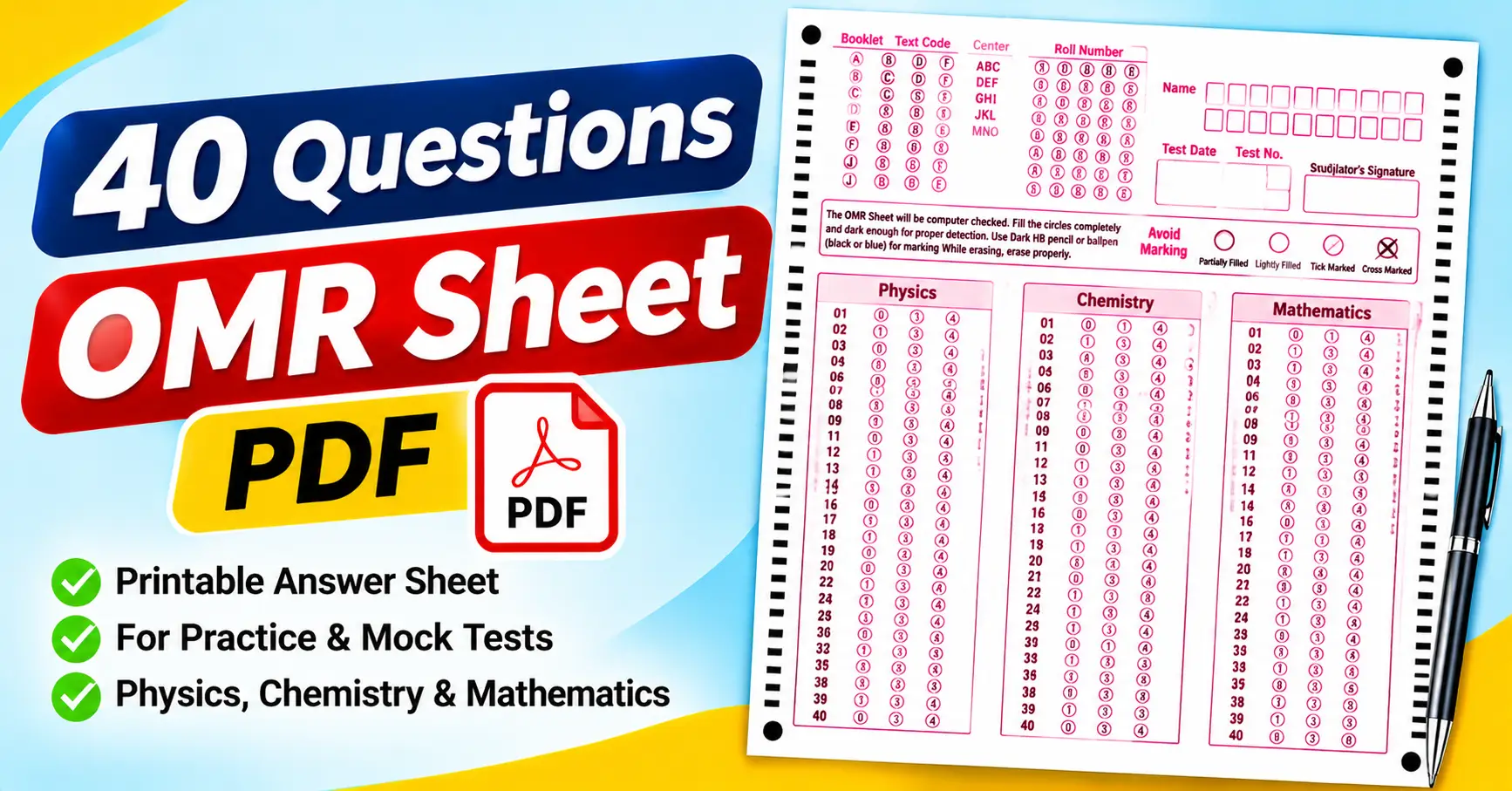
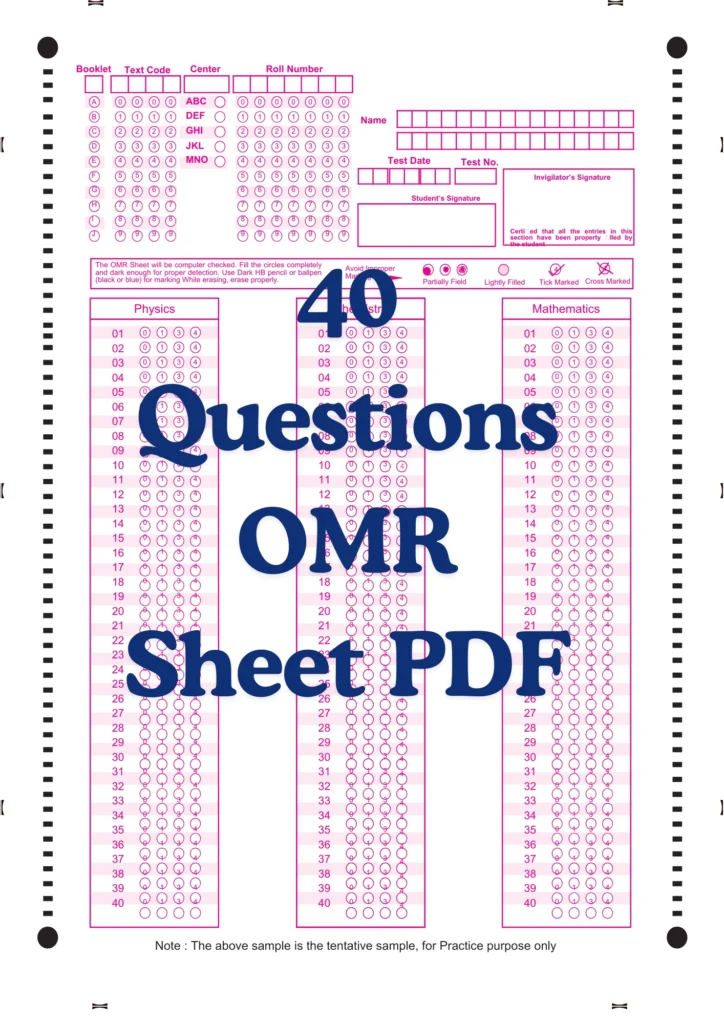
The attached PDF contains a sample 40-question answer sheet with separate sections for Physics, Chemistry, and Mathematics. It also includes student identification fields, booklet and test details, signature spaces, and instructions for marking responses.
In this guide, we will examine the attached sheet, explain how to print and use it, and cover the common mistakes to avoid when filling in OMR answer bubbles.
What Is a 40-Question OMR Sheet PDF?
OMR stands for Optical Mark Recognition. It is a technology that detects marks in designated areas of a printed form.
Instead of writing the complete answer, students select an option by filling the corresponding bubble. For example, if the answer to Question 12 is option B, the student marks the B bubble in the row numbered 12.
A 40-question OMR sheet follows the same basic principle but contains only 40 numbered questions. This makes it suitable for short tests, chapter-wise assessments, practice exercises, and classroom quizzes.
The PDF format is convenient because you can open it using Adobe Acrobat Reader, a browser’s built-in PDF viewer, or another compatible application. You can then print the sheet and use it alongside your question paper.
One important point: a printable OMR-style sheet is not automatically compatible with every scanner or automated checking application. If you plan to scan the answers, check the requirements of the software or evaluation system first.
What Is Included in the Attached 40 Questions OMR Sheet?
The attached PDF contains a single-page, portrait-oriented practice sheet. Its layout uses pink outlines and labels on a white background, with separate answer sections for three subjects.
The following details are visible in the supplied sample.
1. Booklet and text code fields
The top section includes a booklet field labeled A through J and a text code area containing numeric bubbles from 0 to 9.
These fields are part of the supplied template. If you use the sheet for your own test, explain how students should complete them or whether they can be left blank.
2. Center and roll number
The header contains a center identification field and a roll number bubbling grid.
The roll number grid allows students to record digits by marking the appropriate bubbles. This helps identify each response sheet when several students take the same assessment.
Students should verify their roll numbers before marking the bubbles. An identification error can create confusion even when the answers themselves are correct.
3. Student name
The sheet provides a dedicated name area with boxes for entering letters.
When using this section, students should follow the instructions supplied with the form. If the test requires a particular method for recording names, demonstrate it before the assessment begins.
4. Test date and test number
The attached template includes separate fields for the test date and test number.
These fields can help teachers distinguish between different practice sessions, especially when the same class completes several short tests during a revision period.
5. Student and invigilator signatures
The sheet contains separate spaces for the student’s signature and the invigilator’s signature. It also includes a statement confirming that the student has filled in the required details correctly.
These sections can be useful when the organizer requires signatures. For informal practice, their use depends on the test instructions.
6. Marking instructions and examples of improper marking
The attached sheet states that it will be computer-checked and instructs students to fill circles completely and darkly enough for proper detection.
It specifies a dark HB pencil or a black or blue ballpoint pen for marking. It also advises students to erase marks properly when making corrections.
A visual guide labeled “Avoid Improper Marking” illustrates examples such as partially filled, lightly filled, tick-marked, and cross-marked bubbles.
These instructions are particularly useful for teaching students how to mark responses clearly. For official examinations, however, the relevant examination authority’s current instructions should take priority.
7. Three subject-wise answer sections
The main section is divided into three columns:
- Physics: Questions 01–40
- Chemistry: Questions 01–40
- Mathematics: Questions 01–40
Each subject has 40 numbered rows. The response bubbles shown in the attached sample are labeled 0, 1, 3, and 4.
This is an important detail about the supplied file. The sample does not show a conventional A–D answer-option layout; it displays numeric response labels in each subject section. Before using it with a multiple-choice question paper, verify that these labels match the intended answer choices.
The sample also includes a note stating that it is a tentative sample for practice purposes only.
Who Can Use a 40 Questions OMR Sheet?
A 40-question answer sheet can be useful when you want to practice assessing a limited set of questions without a lengthy examination.
Students preparing for exams
Students can use a short answer sheet to practice marking responses, check their understanding of a chapter, or revise a subject before a larger mock test.
For example, a student revising a Physics chapter can attempt 40 questions and then compare the recorded answers with a prepared answer key.
Teachers conducting classroom quizzes
Teachers can use short OMR-style assessments to evaluate student understanding after completing a topic.
A 40-question test fits more easily into a short revision session than a full-length examination. The teacher can collect the sheets and review common errors afterward.
Coaching institutes
Coaching centers can use short tests to assess individual topics or track progress during a revision program.
Students can practice transferring answers to a separate sheet and develop the habit of checking question numbers before marking responses.
Schools and colleges
The attached sheet includes separate Physics, Chemistry, and Mathematics sections. This makes it a useful reference for subject-based practice where the question paper and response format match.
Before using the template, check that its response labels match the questions being asked.
Tutors and individual learners
Private tutors can use a short answer sheet for diagnostic tests, homework reviews, and revision exercises. Individual learners can also print a copy to practice recording answers consistently.
How to Print the 40 Questions OMR Sheet PDF
A readable printout is essential, particularly when students need to fill small bubbles or when the form will be scanned.
Step 1: Open the PDF
Open the supplied file in Adobe Acrobat Reader or another compatible PDF viewer.
Check the complete page, including the identification fields, subject headings, Question 40 in each section, and the note at the bottom.
Step 2: Select the correct paper size
Choose a paper size that matches the original PDF and your printer’s settings. A4 paper is commonly used in India, but verify the file dimensions before printing.
Avoid stretching the page to fit a different paper size, as this can affect the layout and readability of the bubbles.
Step 3: Check the print preview
Review the scaling options, such as “Actual Size” and “Fit,” to make sure the full page will print correctly.
Confirm that the outer marks, text fields, and bottom note are not cut off.
Step 4: Use suitable print quality
For manual practice, a clear print is usually sufficient. If you intend to use automated evaluation, follow the requirements of the relevant scanning system.
Do not assume that every printable form can be processed automatically simply because it includes bubbles and alignment marks.
Step 5: Print one sample first
Print one copy and inspect the question numbers, response labels, and student information fields.
Because the supplied sample uses numeric response labels, check that the sheet matches your intended test before printing copies for an entire class.
Step 6: Prepare the sheets for students
Once you’ve checked the sample, print the required number of copies. Distribute the sheets alongside the question paper and explain how students should fill in their details and record answers.
How to Fill a 40-Question OMR Sheet Correctly
Even a short test can produce marking errors if students rush through the answer sheet. A simple routine can help keep the responses oorganized
Step 1: Complete the student details
Write your name and fill in the required center and roll number information. Enter the test date and test number if requested.
Check the roll number before filling in its digit bubbles. If the form includes booklet or text codes, follow the test organizer’s instructions for those fields.
Step 2: Understand the answer format
Before answering the first question, check how the options are represented on the sheet.
The attached sample displays Physics, Chemistry, and Mathematics sections, with numeric response bubbles labeled 0, 1, 3, and 4. It does not display the usual A, B, C, D labels.
If your question paper uses A–D or A–E options, this sample may require adaptation or may not be suitable as supplied. Do not assume that the printed labels correspond to conventional multiple-choice options.
Step 3: Find the correct subject section
If you are using the attached sheet for a subject-based assessment, identify the correct column before recording your response.
The sample has 40 rows for each of the three subjects. This means that Question 10 in Physics and Question 10 in Chemistry appear in different columns.
Always match the subject and question number with the corresponding response row.
Step 4: Mark the selected response clearly
The supplied instructions recommend filling circles completely and darkly enough for computer detection. They specify a dark HB pencil or a black or blue ballpoint pen.
For a practice test, follow the instructions that accompany your particular sheet. For an official examination, use the writing instrument required by the examination authority.
Avoid ticks, crosses, and partially filled bubbles if the form is designed for OMR evaluation.
Step 5: Correct mistakes carefully
The attached sheet instructs students to erase marks properly when making corrections. However, the acceptability of corrections depends on the examination and checking system.
If the sheet is intended for automated evaluation, check the correction policy before changing a response. Some systems may interpret remaining marks as ambiguous answers.
Step 6: Review the answer sheet
Before submitting the sheet, check that the required student details are complete and that every recorded response matches the intended question.
Pay particular attention to skipped questions and the transition between subject sections. A quick review can catch errors that are easy to overlook while answering.
How to Check Answers After the Test
Once students have completed the 40-question assessment, you can evaluate their responses manually or use a spreadsheet.
Manual checking
Prepare an answer key before you start evaluating. Compare each student’s response with the corresponding correct answer and record the number of correct, incorrect, and unanswered questions.
For example, if a student answers 32 questions correctly out of 40, the percentage of correct answers is:
This is the percentage of questions answered correctly, not necessarily the final examination score. If the test uses negative marking, apply the specified scoring rules separately.
Checking with Google Sheets or Microsoft Excel
A spreadsheet can simplify scoring when several students take the same test.
Create columns for the student name, question number, selected response, correct response, and result. A formula can compare the selected answer with the answer key.
For example, if the student’s answer is in cell B2 and the correct answer is in C2, use:
=IF(B2=C2,1,0)
The formula returns 1 for a match and 0 otherwise. For a full test, extend the formula across all questions and account for unanswered responses according to your scoring rules.
Before evaluating a complete class, verify the results against a few manually checked answer sheets.
Automated OMR checking
Automated checking may be useful when assessments are conducted regularly or involve many students.
However, the attached PDF instructions on computer checking do not guarantee compatibility with every OMR application. The software must support its numeric response labels and subject-wise layout.
Test the complete process before relying on automated results. Check how the system reads filled bubbles, blank responses, and corrected marks.
Common Mistakes to Avoid
1. Using a sheet that does not match the question paper. The attached sample uses numeric response labels rather than conventional A–D labels. Verify the answer format before distributing it.
2. Marking the wrong question row. Check the printed question number before filling a response, especially when moving between subject columns.
3. Entering an incorrect roll number. Verify the student identification details before beginning the test.
4. Filling bubbles too lightly. The supplied instructions emphasize complete, sufficiently dark marks. Follow the applicable marking requirements.
5. Making unclear corrections. Erasing or overwriting an answer can leave marks that interfere with evaluation. Follow the correction rules for the specific sheet.
6. Printing the PDF at the wrong scale. Check the page dimensions, print preview, and readability before producing multiple copies.
7. Assuming the sample is an official examination form. The attached page explicitly identifies itself as a tentative sample for practice purposes only. Use the required official format whenever an examination authority specifies one.
Frequently Asked Questions
1. How many questions are included in the attached OMR sheet?
The attached PDF contains 40 questions in each of three subject sections: Physics, Chemistry, and Mathematics. It therefore provides 120 subject-wise response rows in total, arranged as three separate 40-question sections.
2. Does the attached sheet use A, B, C, and D options?
No. The visible response bubbles in the attached sample are labeled 0, 1, 3, and 4. Check that these labels match your intended test before using the sheet.
3. Can I print the sheet at home?
Yes. Open the PDF in a compatible viewer, select the appropriate paper size, check the print preview, and print one test copy before making additional copies.
4. Can I use this sheet for Physics, Chemistry, and Mathematics?
The attached sample contains separate sections for all three subjects, each with 40 numbered rows. Make sure the response labels are suitable for the questions you plan to ask.
5. Can I use the sheet for official competitive examinations?
The supplied file states that it is a tentative sample for practice purposes only. For official examinations, use the format and instructions provided by the relevant examination authority.
6. Can I calculate marks in Google Sheets?
Yes. You can enter student responses and the correct answers into a spreadsheet and use formulas to compare them. Enter the answer data accurately, and test the formulas before calculating final scores.
7. Is every printable OMR sheet compatible with scanning software?
No. Automated recognition depends on the sheet layout, bubble positions, printing quality, and software compatibility. Confirm these requirements before using an automated checking system.
Final Thoughts
A 40 Questions OMR Sheet PDF can be useful for short practice tests, classroom assessments, chapter revisions, and subject-wise quizzes. It gives students a structured way to record answers and helps teachers organize evaluation.
The attached sample includes Physics, Chemistry, and Mathematics sections, along with booklet and text codes, center and roll number fields, student details, test information, signature areas, and instructions for proper marking.
Before using it, check the response labels carefully. The supplied sample is intended for practice and uses numeric labels rather than conventional A–D options. Print a test copy, verify the layout, and explain the marking rules before distributing it.
These small checks help make a short assessment easier to organize and reduce avoidable marking errors.